
Why there is always a cloud within reach in Cloud Hop
Oct 25, 2026 · Game design · 한국어
In Cloud Hop a chick bounces on its own and you only steer left and right. The clouds are placed at random, but a board with no cloud in reach never happens, by rule. It is not luck. The rule that places the clouds has a limit built in.
The game is drawn on a browser <canvas> with the 2D drawing API. The board is 360 pixels wide and 600 tall, and the vertical coordinate gets smaller as you go up. Height is counted as 10px per meter. The jump is computed from an upward launch speed and a downward gravity, and every cloud launches the chick with the same speed.
If you pick the vertical gap between clouds freely in a game that only goes up, you will sometimes get a gap no jump can cross. Then the run ends right there. It isn't that the player failed; the game made it impossible. The player can't tell why and just feels it was unfair.
There are two ways to solve this. You can place all the clouds first, check whether the path is connected, and place them again if it is broken. Or you can use a placement rule that can't break the path in the first place. Cloud Hop takes the second way.
Every time the chick lands on a cloud it is launched at the same speed. The maximum height of that jump follows from a simple formula. With a launch speed of 800 and gravity of 1500, the peak height is the square of the speed divided by twice the gravity.
const G = 1500, JUMP = -800;
// peak height = JUMP * JUMP / (2 * G) = about 213px
So the next cloud has to be within 213px of the current one to be reachable by jumping alone. The board is 360 by 600 with 10px per meter, so 213px is quite high on this board.
When a new row of clouds is placed, the vertical gap to the cloud below is chosen like this (shortened from the game code).
topY -= rand(55, Math.min(150, 85 + height / 12));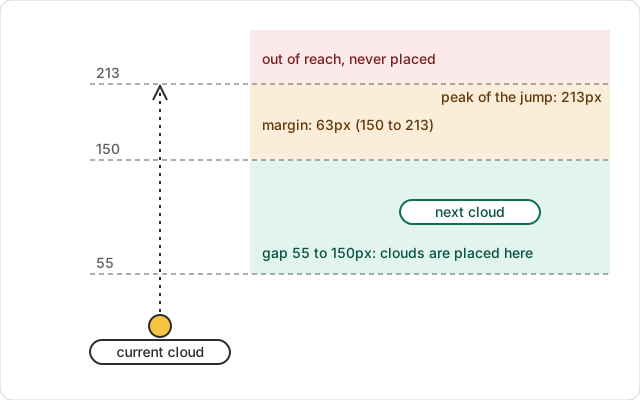
The minimum gap is 55px. The maximum starts at 85px and grows slowly with height. It reaches 150px at around 780m and stays there. As long as that 150px is below 213px, the next cloud is reachable by a jump on every board. Because the limit is built in, there is no need to check and re-place.
The gap widens with height because of difficulty. At the start the clouds are close together and easy; higher up they get sparse, and you have to steer precisely. However hard it gets, the guarantee that you can reach the next cloud stays.
The cap is about 63px below the jump height rather than equal to it, and there is a reason. At the peak of a jump the chick is almost standing still. A cloud that only just fits at the peak leaves the player too little time to line up sideways. Keeping the cap below the jump height buys that margin. The 213px limit comes from the physics, and 150px is a value chosen inside it.
You can climb the clouds placed by this rule yourself. Clouds that drop you when you step on them, like the gray ones, are placed separately from the path, and that is a story for another post.
References
- GDC 2016, Math for Game Programmers: Building a Better Jump (Kyle Pittman): https://gdcvault.com/play/1023148/Math-for-Game-Programmers-Building
- Wikipedia, Equations of motion: https://en.wikipedia.org/wiki/Equations_of_motion
- Wikipedia, Procedural generation: https://en.wikipedia.org/wiki/Procedural_generation
Games from this post
 Cloud HopBounce from cloud to cloud and climb as high as you can. Gray clouds fall apart, and storm clouds must be stomped from above!
Play
Cloud HopBounce from cloud to cloud and climb as high as you can. Gray clouds fall apart, and storm clouds must be stomped from above!
Play
More posts
- I deployed, and the old page kept showing for an hour Oct 25, 2026
- Why the crumbling clouds never sit on the path Oct 25, 2026
- I removed the background and a pink edge was left Oct 25, 2026
- Three tries in one day to decide what not to deploy Oct 25, 2026
- A ten-line FPS counter for browser games Oct 25, 2026