
I set no-cache and the CDN sat idle
Oct 25, 2026 · Operations · 한국어
To make sure people see the new screen right after a deploy, I gave JS, CSS and HTML Cache-Control: no-cache. With that, the browser always checks with the server before using a file. It is safe, but it had a cost.
A CDN keeps copies of your files in many places around the world and serves them from somewhere close. Firebase Hosting has a CDN in front of it, so when a copy exists the CDN answers directly without going to the origin server. When a browser asks whether a file it already has has changed (a conditional request), the CDN can answer briefly with 304, meaning not modified, and no body is sent again.
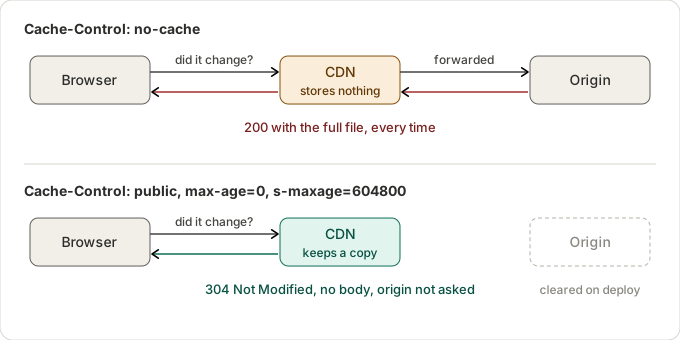
no-cache doesn't mean don't store; it means check before using. The browser sends a conditional request. If the file hasn't changed, the server answers 304 and the body doesn't need to be sent again. That is the intended flow.
But the CDN in front of Firebase Hosting doesn't store no-cache responses. So even when a conditional request came in, it went all the way to the origin and sent back the full file with a 200 every time. When I looked, there were almost no 304s and the CDN kept missing the cache. Even though nothing had changed, every visitor was downloading the same JS and CSS in full each time.
The behavior I wanted was this. The browser checks with the server every time it uses a file, so it is always up to date. The CDN answers that check with a 304 on the server's behalf, so the request never reaches the origin. So I changed the header like this.
Cache-Control: public, max-age=0, s-maxage=604800max-age=0 tells the browser to store the file but check every time. s-maxage=604800 allows shared caches (the CDN) to store it for up to a week. public marks the response as one the CDN may store.
Won't old files linger after a deploy?
With a week of storage in the CDN you would expect old files to go out even after a deploy, but Firebase clears what the CDN has stored when you deploy. So a new deploy takes effect right away.
References
- Jake Archibald, Caching best practices & max-age gotchas: https://jakearchibald.com/2016/caching-best-practices/
- MDN, Cache-Control: https://developer.mozilla.org/en-US/docs/Web/HTTP/Headers/Cache-Control
- MDN, 304 Not Modified: https://developer.mozilla.org/en-US/docs/Web/HTTP/Status/304
- MDN, ETag: https://developer.mozilla.org/en-US/docs/Web/HTTP/Headers/ETag
- Firebase, Manage cache behavior: https://firebase.google.com/docs/hosting/manage-cache
More posts
- I deployed, and the old page kept showing for an hour Oct 25, 2026
- Why there is always a cloud within reach in Cloud Hop Oct 25, 2026
- Why the crumbling clouds never sit on the path Oct 25, 2026
- I removed the background and a pink edge was left Oct 25, 2026
- Three tries in one day to decide what not to deploy Oct 25, 2026