
Getting a transparent background out of AI art that can't make one
Oct 25, 2026 · Art and sound · 한국어
The chick and the clouds in Cloud Hop were made with an image generator. To use them in the game the background has to be transparent, and the tool I used couldn't produce one. So I needed a way to remove the background myself.
The game art was made with an image generation model (Gemini). It draws a picture from a text description, but it couldn't give me a picture with a transparent background directly. The tools below are scripts written in Swift. Swift is Apple's programming language, and once the developer tools are installed on a Mac you can run a file like a script with swift file.swift.
First you have it draw on a single flat color. It has to be a color the art almost never uses, so I picked magenta (#FF00FF). A sheet that holds several frames works the same way. I asked for frames such as the chick with its wings up and the chick falling, laid out in a 2×2 grid on magenta, and the tool that cuts the sheet into cells removes the background the same way.
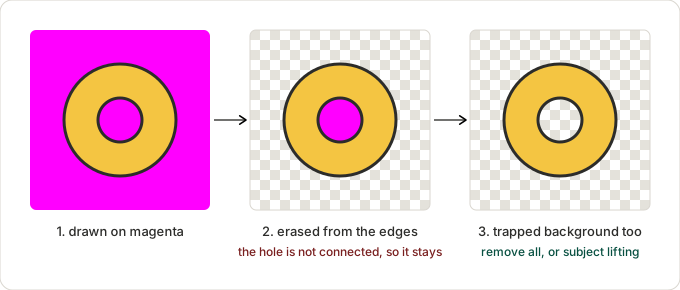
Erasing every pixel that looks like magenta won't do, because colors from the same family inside the art would be erased too. So the tool starts from the four borders of the image. It takes the most common color along the border as the background, and makes pixels that are similar to it transparent, spreading inward from the outside. The same color that isn't connected to the outside is part of the art, so it stays.
For a single image such as an icon, I use a separate tool that only removes the background.
swift tools/art/remove-bg.swift input.png output.png 40 256The third argument (40) is the tolerance, how close to the background color a pixel must be to be erased. After erasing, small blobs separated from the main art are removed too. The small mark the generator leaves in a corner is the typical example. Finally the image is cropped to the art and resized to a square.
Background that isn't connected to the edge isn't removed this way. The holes of a net or the inside of a ring are like that. For those there is an option (--all) that erases the background color from the whole image, and it is only safe when the art itself doesn't use that color. Another way is to cut out the subject with the subject recognition built into macOS (Vision, which can cut people and objects out of photos) instead of using color. It runs locally, so there is nothing to install and no fee, and it also handles trapped background and JPEG noise well.
Even so, a little magenta is left along the edges. How to get rid of that fringe is in another post.
References
- Wikipedia, Chroma key: https://en.wikipedia.org/wiki/Chroma_key
- Wikipedia, Flood fill: https://en.wikipedia.org/wiki/Flood_fill
- Apple, Vision framework: https://developer.apple.com/documentation/vision
Games from this post
 Cloud HopBounce from cloud to cloud and climb as high as you can. Gray clouds fall apart, and storm clouds must be stomped from above!
Play
Cloud HopBounce from cloud to cloud and climb as high as you can. Gray clouds fall apart, and storm clouds must be stomped from above!
Play
More posts
- I deployed, and the old page kept showing for an hour Oct 25, 2026
- Why there is always a cloud within reach in Cloud Hop Oct 25, 2026
- Why the crumbling clouds never sit on the path Oct 25, 2026
- I removed the background and a pink edge was left Oct 25, 2026
- Three tries in one day to decide what not to deploy Oct 25, 2026