
Releasing the stone with momentum: a day of fixing Trebuchet
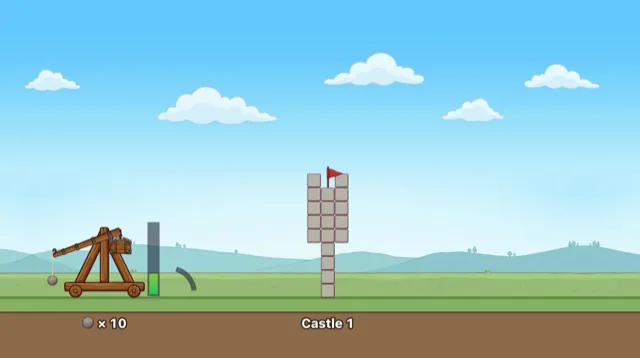
Trebuchet is a game where you launch stones from a trebuchet to knock down a castle on a hill. The controls are two presses. The first press stops a power gauge that moves up and down, and the counterweight drops and swings the arm. The second press releases the stone. Release early and it flies high; release late and it flies low. Knock down the flag at the top of the castle to capture it and move on to the next one.
Here is the physics-related trial and error, in order.
At first, the stone was launched fresh at release
The first version's release was simple. The arm swung steadily for 0.8 seconds, and where the second press fell within those 0.8 seconds set the angle: 75° at the start, 5° at the end. The speed came from the power gauge. The stone was then launched fresh at that angle and speed.
// first version: a fresh launch at release, unrelated to how the sling was moving
function release(s) {                         // s: 0..1 through the swing
  const angle = 75 - 70 * s;
  const v = 180 + power * 300, a = (angle * Math.PI) / 180;
  stone = { x, y, vx: Math.cos(a) * v, vy: -Math.sin(a) * v };
}
Playing it, two things felt off. One was that the stone seemed to get a sudden push at the end of the sling and shoot off. Even when the arm was swinging slowly, the stone flew at its set speed, so the arm's motion and the stone's didn't connect. The other was that the stone still flew forward nicely even if you missed the second press. Not pressing at all was treated as releasing at 5°. You missed the timing and paid nothing for it.
A table of the path the sling's tip follows
In a real trebuchet the stone isn't launched separately. It circles at the end of the sling, and when the sling lets go, it flies on in exactly the direction and speed it was moving. To do that, I needed to know which way and how fast the stone was moving at the moment of release.
The stone's position follows from the arm angle. A 64px arm swings from 160° to 310°, and a 30px sling hangs from its tip. The sling first hangs straight down from the tip, then straightens outward as the arm swings. The sling started at 16px and was lengthened to 30px.
The path the stone follows while the arm swings is cut into 600 pieces and stored as a table (PATH). For each piece it records the length travelled up to that point and the direction of motion there (the tangent).
// the path of the stone at the sling's tip: travelled length and tangent at each step
const PATH = [];
for (let i = 0, len = 0; i <= 600; i++) {
  const p = slingPos(TH0 + (TH1 - TH0) * (i / 600), i / 600);
  if (i) len += Math.hypot(p.x - PATH[i - 1].x, p.y - PATH[i - 1].y);
  PATH.push({ x: p.x, y: p.y, len });
}
// then for each point: ux, uy = unit vector toward the next point, dir = its angle
Next, swingAt decides how far along this path the stone has gone at a given time. Up to the point where the stone moves at 75°, it speeds up evenly to reach speed v. v comes from the power gauge (180 + power × 300 px/s). Between 75° and 5°, the release window, v stays the same. After that the arm slows down, reaching 0.3v at the end.
At release, the stone's velocity is the tangent at that point times the speed. Nothing else is computed.
function release() {
  const m = swingAt(swingT, swingV);       // travelled length and speed now
  const q = pathAt(m.len);                 // tangent at that point of the path
  stone = { x, y, vx: q.ux * m.sp, vy: q.uy * m.sp };
}
This fixed both problems at once. The stone flies on exactly as it was moving at the end of the sling. Release too early and a stone still moving up and back flies up and back. Miss the press and the arm swings all the way, the sling wraps forward and down, and the stone slams into the ground just in front of the trebuchet (x about 175 to 215). Now a miss costs a shot.
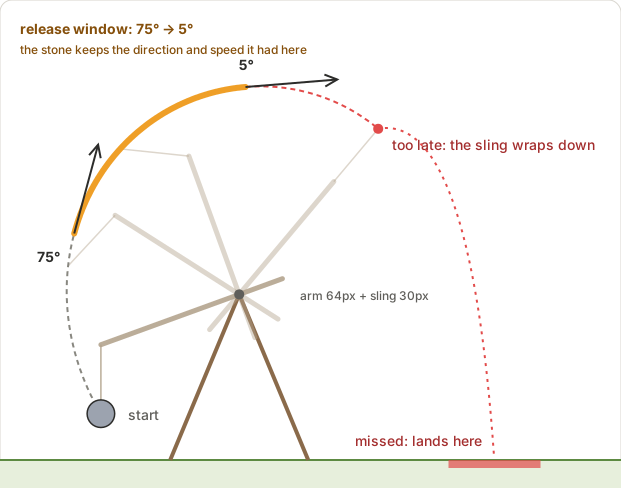
There was a cost. The release window got shorter. At full power you have to press between 0.34 and 0.56 seconds after the first press, a 0.22-second window. At half power it's 0.49 to 0.81 seconds, and at zero power 0.9 to 1.5 seconds. Before, you picked from 75° to 5° evenly over 0.8 seconds. With the arm and sling together only about 94px long, the stretch where the stone turns from 75° to 5° is short. Throwing far needs speed, so the stone passes that short stretch quickly. It's a limit set by the size of the trebuchet. After playing more rounds, if it's too tight, I plan to lower gravity to reduce the speed needed, or lengthen the sling to widen the path.
Castles fall by a support rule, not rigid-body physics
A castle is stone blocks on a 16px grid. I didn't add real rigid-body physics with blocks tilting and rolling. Hitting the same spot would give inconsistent results, and the collapse would take a long time to settle. Instead, a rule decides whether a block is supported.
- The bottom row, resting on the hill, is supported.
- A block in a higher row is supported if the block directly below it is supported.
- Even with nothing directly below, a block is supported if it connects without a gap to a supported block in the same row, within 2 cells. A small overhang like eaves holds up.
- Every unsupported block becomes a falling piece.
function settle() {
  for (let j = 0; j < rows; j++) {
    for (let i = 0; i < cols; i++) if (grid[j][i] && (j === 0 || sup[j - 1][i])) sup[j][i] = true;
    if (j === 0) continue;
    const anchor = sup[j].slice();
    for (let i = 0; i < cols; i++) {
      if (!grid[j][i] || anchor[i]) continue;
      for (const d of [-1, 1]) for (let s = 1; s <= 2; s++) {   // look up to 2 cells sideways
        const x = i + d * s;
        if (x < 0 || x >= cols || !grid[j][x]) break;              // gap: no support this way
        if (anchor[x]) { sup[j][i] = true; break; }
      }
    }
  }
  // every block without support falls
}
When a stone hits a normal block, the block breaks and the stone continues through it at 0.55 times its speed. A hard block needs two hits to break, and the stone stops where it hits. A stone slower than 150px/s can't break blocks. Whenever a block breaks, the support rule runs again.
At first, each falling block got a small random sideways push and spin. Even a tall tower, when it collapsed, scattered in place instead of leaning to one side. So I gave each falling block sideways speed and spin toward the side the stone came from. The higher a block was above the row where falling begins, the more it's pushed and the faster it spins. Each block still falls on its own, but since the top goes farther, the tower looks like it tips over in one piece.
The near castle wasn't easy
The first castle is close to the trebuchet. Yet while it was easy to hit, it was hard to capture. To capture it you have to break or drop the one block holding the flag, and a single block at the top of the keep behind the wall is a small target.
I measured how hard it was rather than guessing. I ran the game code in Node's vm and had it throw many times with power and release timing picked evenly at random. The rate of capturing the first castle with the first stone was about 1.4%.
So castles 1 to 3 changed shape. Instead of walls, they're tall towers on pillars. The 3-cell-wide body stands on the pillars, so breaking a pillar leaves the whole tower without support under the support rule, and it topples in one piece. A pillar is 4 to 6 times easier to hit than the flag block. Castle 1 has one pillar in the middle, castle 2 has two at the ends (one left standing holds it up), and castle 3 has one pillar and a low wall in front. Measured again, the first-stone capture rate became about 8% for castles 1 and 2 and about 12% for castle 3. From castle 4 on, castles have walls and a keep as before.
References
- Wikipedia, Trebuchet: https://en.wikipedia.org/wiki/Trebuchet
Games from this post
 TrebuchetHurl stones with a trebuchet and bring castles down. Topple the flag to capture and march on!
Play
More posts
- A jelly character that moves with five shapes instead of bones Nov 1, 2026
- Making a 3D-looking racing game on a 2D canvas with pseudo 3D Nov 1, 2026
- Rolling a 3D die without a library and stopping on the face you want Nov 1, 2026
- The board flashed on iPhone every time a card moved Nov 1, 2026
- Making engine, wind and tire sounds with Web Audio and no sound files Nov 1, 2026